UAE compliance
WorkOSync is built for the UAE. Federal Tax Authority rules, the Wage Protection System, licence and visa renewals and Arabic support are part of the core, not add-ons, so staying compliant is a by-product of using the platform normally. This page explains each obligation and where WorkOSync handles it.
This page explains how WorkOSync supports UAE compliance. It is not tax or legal advice. Confirm your specific obligations with the FTA or your tax adviser.
VAT registration and TRN
Once you register for VAT with the FTA you receive a fifteen-digit Tax Registration Number (TRN). Enter it in Settings under the company profile and WorkOSync prints it on every tax invoice, quotation and statement and uses it throughout VAT reporting. Customer TRNs are stored on the customer record and printed in the Bill to block of their invoices.
Tax invoices
Invoices raised in WorkOSync meet the FTA requirements for a tax invoice:
- The words TAX INVOICE, your legal name, address and TRN.
- A sequential invoice number, the issue date and the due date.
- The customer's name, address and TRN.
- A description, quantity, rate and amount per line, with the VAT rate applied.
- The subtotal excluding VAT, the VAT amount shown separately and the total in AED.
- The footer line stating the document is a computer-generated tax invoice compliant with FTA requirements.
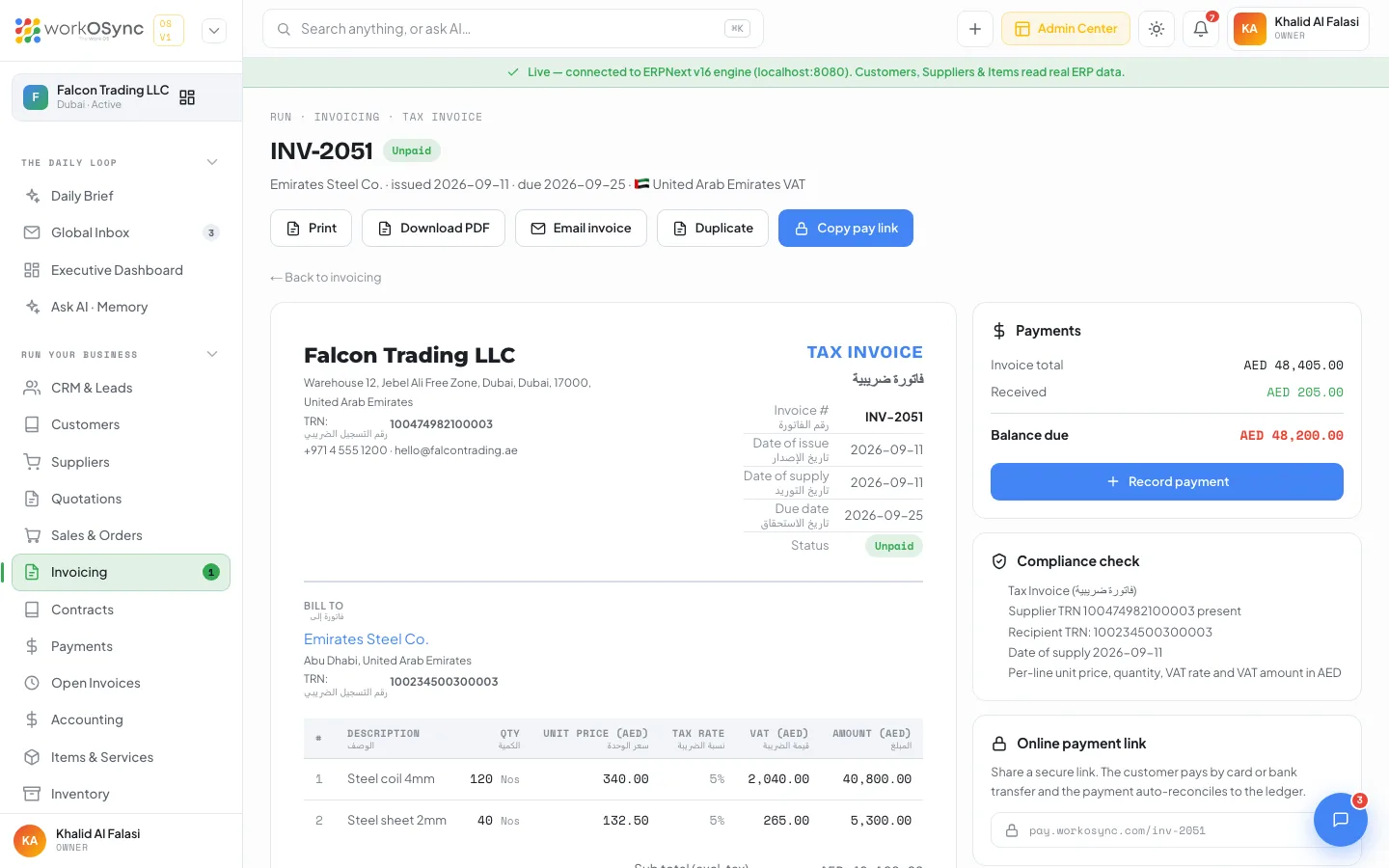
A proforma invoice is deliberately labelled NOT A TAX INVOICE and creates no VAT liability; the tax invoice is issued on supply. Credit notes reduce the boxes of the period in which they are issued.
The VAT 201 return
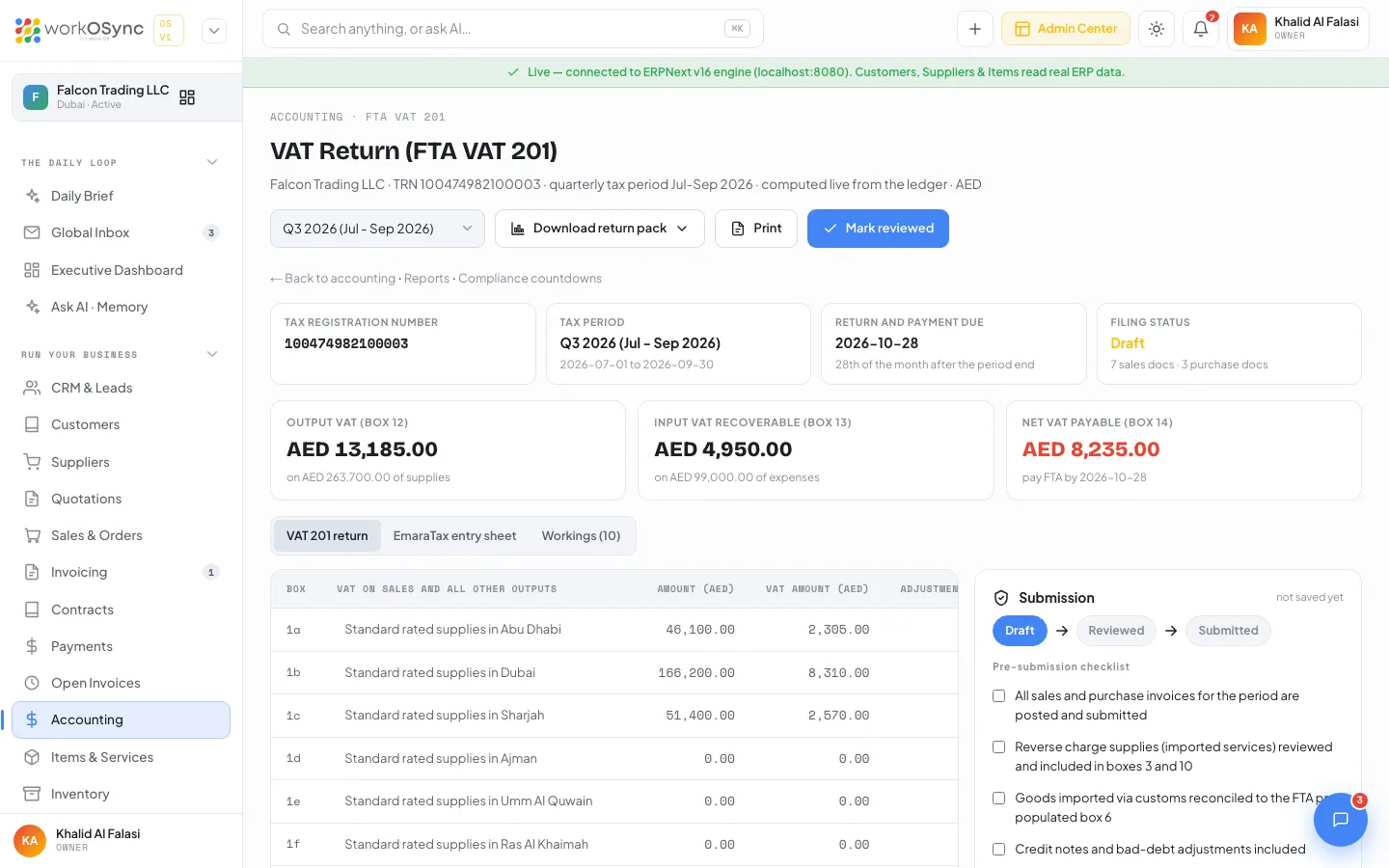
The VAT 201 is the periodic return filed with the FTA on EmaraTax. Because every sales invoice, purchase bill and credit note in WorkOSync carries its tax treatment and the customer's emirate, the return assembles itself from the ledger. Open Accounting and choose VAT Return (FTA 201).
Tax periods and due dates
The period selector lists quarterly periods (the current quarter and the previous seven) and monthly periods (the current month and the previous eleven). The return and payment are due on the 28th of the month after the period end, which the header tile shows alongside your TRN, the period dates and the filing status. The counts of sales and purchase documents in the period sit under the status.
The boxes
| Box | Line | What WorkOSync puts there |
|---|---|---|
| 1a to 1g | Standard rated supplies in Abu Dhabi, Dubai, Sharjah, Ajman, Umm Al Quwain, Ras Al Khaimah and Fujairah | Sales at 5 percent split by the customer's emirate, taken from the billing address (state, then city; Dubai when unknown). |
| 2 | Tax refunds provided to tourists | Refunds under the Tax Refunds for Tourists Scheme. |
| 3 | Supplies subject to the reverse charge provisions | Output VAT on imported services, recovered again in box 10. |
| 4 | Zero rated supplies | Exports and other zero-rated sales. |
| 5 | Exempt supplies | Exempt sales such as certain financial services and residential leases. |
| 6 | Goods imported into the UAE | Output VAT on goods imported via customs, which the FTA pre-populates; recovered in box 10. |
| 7 | Adjustments to goods imported into the UAE | Corrections to box 6. |
| 8 | Totals | Total outputs and output VAT. |
| 9 | Standard rated expenses | Purchases at 5 percent and the recoverable input VAT. |
| 10 | Supplies subject to the reverse charge provisions | Input VAT recovered on the reverse-charge amounts in boxes 3 and 6. |
| 11 | Totals | Total inputs and recoverable VAT. |
| 12 | Total value of due tax for the period | Output VAT. |
| 13 | Total value of recoverable tax for the period | Input VAT. |
| 14 | Net VAT due (or reclaimable) for the period | Box 12 less box 13. Red when payable, green when reclaimable (refund or carry forward). |
| PMS | Profit margin scheme | Yes or No, from the checkbox in the submission panel (second-hand goods, antiques, collectors' items). |
Every box shows Amount (AED), VAT Amount (AED) (or Recoverable VAT for inputs) and Adjustment (AED), the last being for bad-debt relief and prior-period corrections.
Three views
- VAT 201 return: the boxes laid out as the return.
- EmaraTax entry sheet: the same figures in the order and with the exact labels of the EmaraTax portal, so you can key them in line by line.
- Workings: every document behind the figures, with its party, date, box, emirate, type, amount and VAT. Invoices link to their record.
Filing workflow
- Pick the period and review the boxes
Choose the quarter or month. Use the Workings view to check any figure back to its invoice or bill.
- Complete the pre-submission checklist
All sales and purchase invoices posted and submitted; reverse-charge supplies reviewed in boxes 3 and 10; imported goods reconciled to the FTA pre-populated box 6; credit notes and bad-debt adjustments included; payment scheduled before the due date via GIBAN or e-Dirham. Tick the profit margin scheme box if it applies.
- Mark reviewed
Enter Reviewed on and Reviewed by, then click Mark reviewed. The button stays disabled until every checklist item is ticked.
- Download the return pack and file on EmaraTax
Download return pack gives the boxes as Excel, CSV or PDF; Print produces a paper copy headed with your TRN, period and status. Key the figures into EmaraTax from the entry sheet.
- Mark submitted
Enter Submitted on (EmaraTax), Submitted by and the FTA acknowledgement reference, add any notes, and click Mark submitted. The page then reminds you of the amount to pay by the due date. Reopen as draft is available if a correction is needed.
Save stores the checklist, dates and reference against the period: in ERPNext as a Note when the engine is connected, or on this device in demo mode. The submission panel shows where the record was saved.
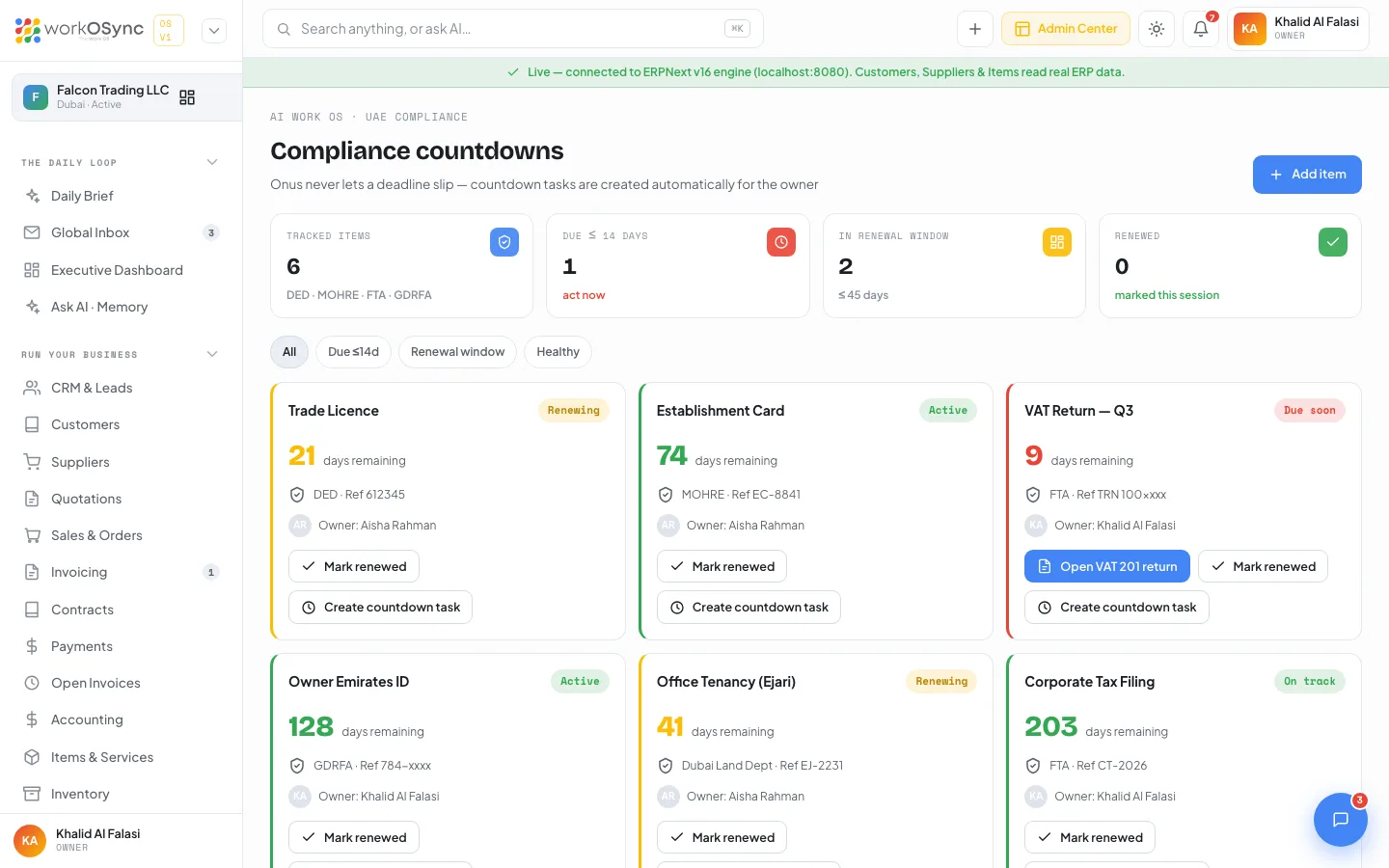
The compliance tracker keeps a countdown to the return, and the Daily Brief surfaces it as the deadline approaches.
Tax regions beyond the UAE
Estimates and invoices can preview tax for other regions when you trade abroad: India GST at 18 percent (CGST and SGST, or IGST for inter-state supply), EU VAT at 20 percent with reverse charge for cross-border B2B, and US sales tax at 8.25 percent. The active region is chosen in Settings and remembered on the document forms; posting to the ledger uses the connected company's tax accounts.
E-invoicing readiness
The UAE is rolling out mandatory e-invoicing. WorkOSync is built toward the Phase 2 requirement, where invoices are exchanged and reported in a structured electronic format through accredited channels. Because invoices are already structured data with TRNs, sequential numbers, line-level tax and emirate, moving to the e-invoicing format is an evolution of what you already produce, not a re-entry of your billing. The platform operator can switch the e-invoicing feature flag on estate-wide from the Platform Console.
WPS payroll
The Wage Protection System requires salaries to be paid through approved channels using a fixed-format Salary Information File (SIF). WorkOSync's monthly payroll run produces salary slips with basic, allowances, deductions and net pay per employee, and Export WPS SIF on the payroll page downloads the file with one employee detail record (EDR) per person and the salary control record (SCR) the bank expects. See HR and payroll for the run, the file layout and which identifiers must come from your registered employee records.
Licences, visas and other deadlines
Beyond tax, a UAE company renews its trade licence and establishment card, keeps Emirates IDs and visas current, registers its tenancy (Ejari) and now files corporate tax. The UAE compliance tracker holds each as a countdown card with its authority (DED, MOHRE, FTA, GDRFA, Dubai Municipality), reference and owner, turning amber at 45 days and red at 14.
Multi-currency and AED
The dirham is the base currency for UAE companies and WorkOSync keeps your books in it. You can hold customers and suppliers in USD, EUR, SAR or GBP and invoice them in their currency, with balances shown as AED equivalents in the list KPIs and base-currency values recorded for your accounts.
Arabic and RTL
WorkOSync supports Arabic and right-to-left layout, so documents and interfaces read correctly for Arabic-speaking staff and customers, in a market where bilingual paperwork is the norm. Users choose their language on My profile; the platform default is set in the Platform Console.